 Everyone knows that the speed of the blog is taken into account when ranking pages in the SERPs. There are various ways to speed up your blog by using CDNs and plugins. In this post, I will be discussing 3 best free services that you can use easily to speed up your WordPress blog.
1. Cloudflare
Cloudflare is one of the best CDN services that you can use for free. You can also create a premium account but for normal blogs the free account is enough. Apart from CDN services, it also provides Security and Analytics Details. Now, let’s take a look at all the features of Cloudflare.CDN
Cloudflare currently has 23 data centers around the world which stores your site’s static files. When a visitor opens your site, Cloudflare makes sure that your site’s static files are retrieved from the nearest data center which in result increases your site’s speed.According to Cloudflare, on average for visitors your site will load twice as fast , will see 65% less requests and 60% of your bandwidth will be saved.
Optimizer
Cloudflare’s web content optimization is one of the best. It has loads of features like AutoMinify CSS and Javascript, Javascript Bundling, Asynchronous Loading, Local Storage Caching etc.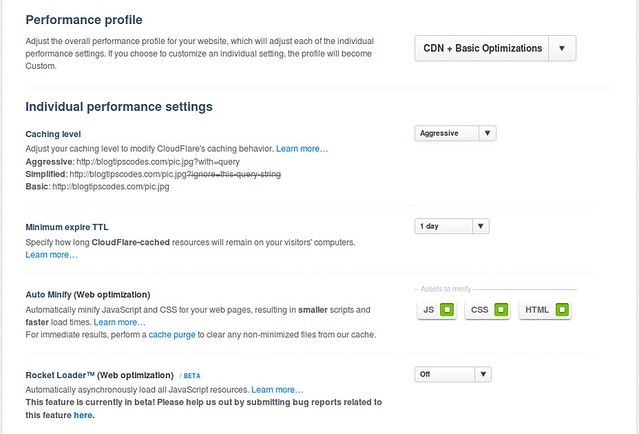
AutoMinifying CSS and Javascript will compress your site’s Javascript and CSS files and results in faster loading. Javascript bundling makes sure multiple javascript requests are converted into a single request instead of multiple ones which results in faster page loading. Asynchronous loading enables your HTML part of the site to load fast without being delayed by slow loading widgets or scripts.
Another recent feature introduced by Cloudflare is the Rocket Loader which is still in BETA. It loads all your Javascript resources asynchronously giving your site more speed. However, some users have reported problems after turning ON this service. Some claimed that their website was not loading properly and some of their scripts were not loading. However, I do not have any problem using this service on one of my blogs. But, if you do face any issue, it is better to turn it OFF.
Security and Analytics
Cloudflare Security and Analytics works hand in hand. Security monitors the threats to your site and Analytics gives you a detailed data of where that threat came from. It also has the feature of blocking a specific user if it finds that the user has the habit of spamming sites around the internet.
Apps
Cloudflare also has some apps which you can easily use with your site. Some of the apps require membership and some are premium which requires you to pay a monthly payment. But overall, it supplies with you some useful apps which you have to check out for yourself.2. Incapsula
Like Cloudflare, Incapsula
has identical features. It’s security features include protection
against scraping, spam and preventing unauthorized access to both the
backend and frontend of your site. It also has a premium plan which you
can use if you’re looking to equip your site with more security.
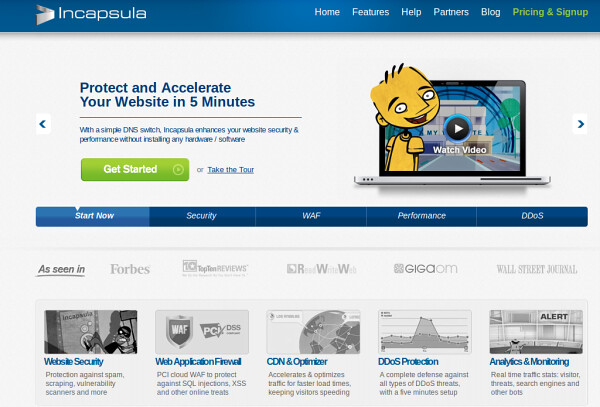
For a free plan, Incapsula offers more security than Cloudflare. It
has a running Web Application Firewall which protects your site from SQL
injections and other online threats. Another feature it has is DDoS protection which basically protects your site from Network and
Application level threats.
It also consists of a CDN and an Optimizer which accelerates your
site and makes loading atleast 40% faster. Like Cloudflare, it also has
Analytics which monitors real time traffic and suspicious bots and sends
you a detailed e-mail about the threats it has encountered.One other thing you should know is Incapsula and Cloudflare are configured in different ways. In Cloudflare, you need to change your Nameservers of the domain while in Incapsula, you need to update your DNS settings IP for your main site. Both of them work in the same way. When a user visits your site, the domain points to your hosting IP via their (Incapsula and Cloudflare) respective servers
3. Google Page Speed Service
Google Page Speed Service
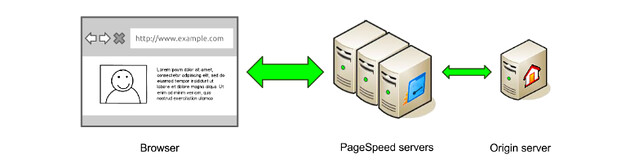
is the one I use currently use for my WordPress blog. It doesn’t have
so much security features like in Incapsula and Cloudflare. But it is
the simplest to configure. All you have to do is add the domain in
Google Page Speed Service and it provide you with a CNAME which you have
to add in the DNS settings of your WWW subdomain.
It only has one kind of security and that is it can block requests based
on IPs you mention in their Block Requests section. It doesn’t provide
security as much but it can sure speed up your blog.
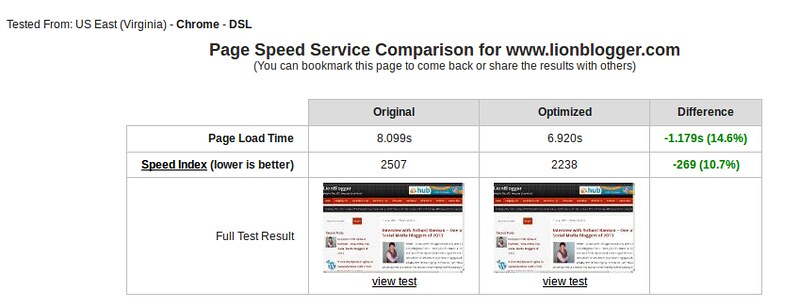
Detailed data about the bandwidth, requests, traffic is shown in the Console API itself. Kulwant Nagi of Blogging Cage, recently wrote a post about it which you can check out here. You can also check out the official guide on how to use the pagespeed service here.
Currently, Google Page Speed Service is provided for free but Google has plans to make this a premium service. So, you can still use it as long as it’s free.
So, what do you think about these free services ? Do share your views in the comment section.

No comments:
Post a Comment